A Complete Toolkit for
Game Visual Enhancement

Seven powerful modules working together to deliver the best possible gaming experience.

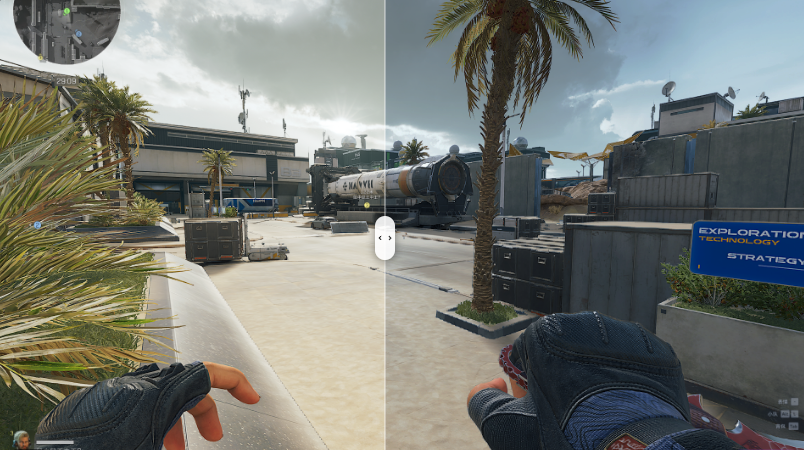
ICC Color Mapping System

The core of DeltaOptimizer Pro. Our ICC filter system applies professional-grade color profiles to your display, correcting color accuracy and enhancing vibrance at the system level — affecting all games and applications.

  • Pre-built ICC profiles for gaming scenarios
  • Custom ICC profile import support
  • One-click profile switching without reboot
  • Color temperature and gamma adjustment
  • Preview before applying
Try It Free
ICC Color Mapping Before / After Comparison
GPU ID RTX 4090
Spoofed → GTX 1060
Tree/Grass LOW (no sway)
FPS Gain +40~60%

GPU Model Spoofing for Higher FPS

Spoof a lower-end GPU model in games so the engine automatically reduces visual quality settings — removing swaying trees, grass animation, and other GPU-intensive effects for significantly higher framerates.

  • Spoof GPU model ID (e.g. RTX 4090 → GTX 1060)
  • Disable tree and grass sway animation
  • Reduce texture quality auto-matching
  • 40–60% FPS boost in compatible games
  • Per-game GPU profile switching
Try It Free

ACE Guard — Anti-Cheat Priority Optimizer

Optimizes the priority of ACE anti-cheat and related protection systems to ensure your game's framerate is never dragged down by background security processes.

  • ACE anti-cheat priority optimization
  • Prevents FPS drops from anti-cheat scans
  • Real-time priority adjustment during gameplay
  • Safe and undetectable — no ban risk
Try It Free
Deep Optimization Applied
Registry Optimization Applied
Windows Optimization Applied
DPC Latency Tune Ready

System Deep Optimization Suite

A complete system-level tuning suite that optimizes your Windows installation for peak gaming performance. Includes registry tweaks, service optimization, and deep system adjustments — all safe and reversible.

  • Deep Optimization: core system tuning for gaming
  • Registry Optimization: GPU and system registry tweaks
  • Windows Optimization: disable background telemetry and bloat
  • DPC latency reduction for smoother frame times
  • One-click apply / revert with restore points
Try It Free

Power Plan Manager

Switch between optimized power profiles for gaming, balanced, or power-saving modes. Import custom power plans and assign them to specific games automatically.

  • Pre-configured gaming power profiles
  • Custom .pow file import
  • Auto-switch plan when game launches
  • CPU affinity and parking control
  • Built-in plans: ACMEPC, AMD, Intel, ggOS
Try It Free
Balanced
Gaming Performance
Power Saver
Custom Profile

Crosshair Overlay

A customizable on-screen crosshair that works with any game. Adjust style, color, thickness, and opacity. Perfect for games without built-in crosshairs.

  • Multiple crosshair styles (cross, dot, T-shape)
  • Custom color and opacity
  • Adjustable size and thickness
  • Click-through overlay (doesn't block input)
  • Toggle with hotkey
Try It Free

Process Priority Manager

Automatically elevate your game's process priority to reduce stuttering and improve frame consistency. Background tasks are deprioritized for smoother gameplay.

  • Auto-boost game process to High priority
  • Deprioritize background apps
  • CPU core affinity assignment
  • Game detection with Steam/Epic/Xbox support
  • Revert settings when game closes
Try It Free
game.exe HIGH
browser.exe NORMAL
updater.exe LOW
sync.exe LOW

Experience All Features

Download DeltaOptimizer Pro and start optimizing your game visuals today.

Download Free Trial View Pricing